Overview
There are a range of workpapers and tax provisions that can be printed to PDF to export from the system. The reports range from a simple e-file transcript all the way to comprehensive detailed tax calculations. There are also options to print workpaper packs for audit purposes, and copies of notes and calculations of tax provisions. All outputs are available by using the print icon in the navigation bar.
Print options and settings
Most reports can be printed at a selected date. If no date is chosen, the report prints at the year-end date. You can also select a Theme and Office for styling if your TaxLab organisation has branded themes set up.
Inland Revenue reports
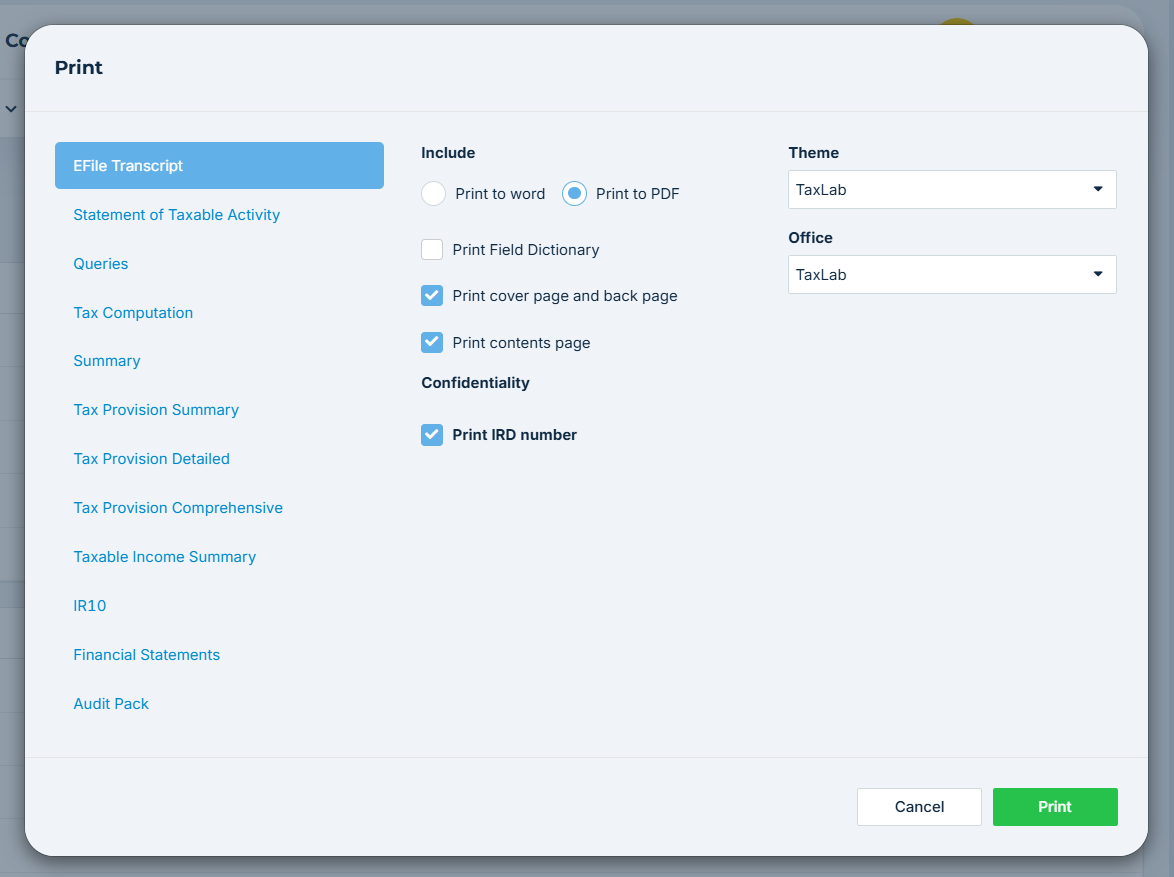
EFile transcript
The EFile transcript is a summary of the income tax return details filed with Inland Revenue (IR). Fields sent to IR display “EFILE” in the output.
You can:
- Print the transcript to PDF or Microsoft Word
- Print the field dictionary (prints a definition of what each field in the report means and how it is used)
- Print a cover and back page on the report (these need to be customised to your organisation at initial setup).
- Print a contents page (added as part of initial setup if custom reports are required for your organisation).
- Print the IRD number on the report (selected by default)
The IR10
The IR10 can be printed to PDF as a paper form, in the styling of the IR paper forms.
Tax calculation reports
Selecting any of these reports for printing will preselect the required settings to obtain the outputs for the reports.
- Statement of taxable activity: This is a printout of the entity's tax position.
- Summary: the tax computation, including tax to pay but excluding accounts and workpapers
- Taxable income summary: the tax computation only
- Tax computation: A full detailed tax computation
- Audit pack: contains all workpapers and attached files to support the statement of taxable activity. This is useful for providing as support to audit teams for any tax calculations disclosed in statutory financial reports.
Tax provision reports
You can print tax provision reports in:
- Summary
- Detailed
- Comprehensive (includes the ledger reconciliation, tax account movements and the current tax proof.)
Queries
Print a report of all open queries for a tax year. Select the reporting date and styling (Office and Theme). This is a useful way to send queries as a single document to an external client.
Troubleshooting and FAQs
Issue: Cannot print a tax return without the watermark
- You can't print a transcript without a 'Draft' watermark until the return has been put into 'Ready to sign'
Related articles
Brand and customise returns and payment notices
Was this article helpful?
That’s Great!
Thank you for your feedback
Sorry! We couldn't be helpful
Thank you for your feedback
Feedback sent
We appreciate your effort and will try to fix the article